Your Mac takes the screenshot. Sowiks does the rest.
Take a screenshot on Mac, annotate it, and turn it into a link — in one click.
Everything unlocked for 7 days. No card, no account.





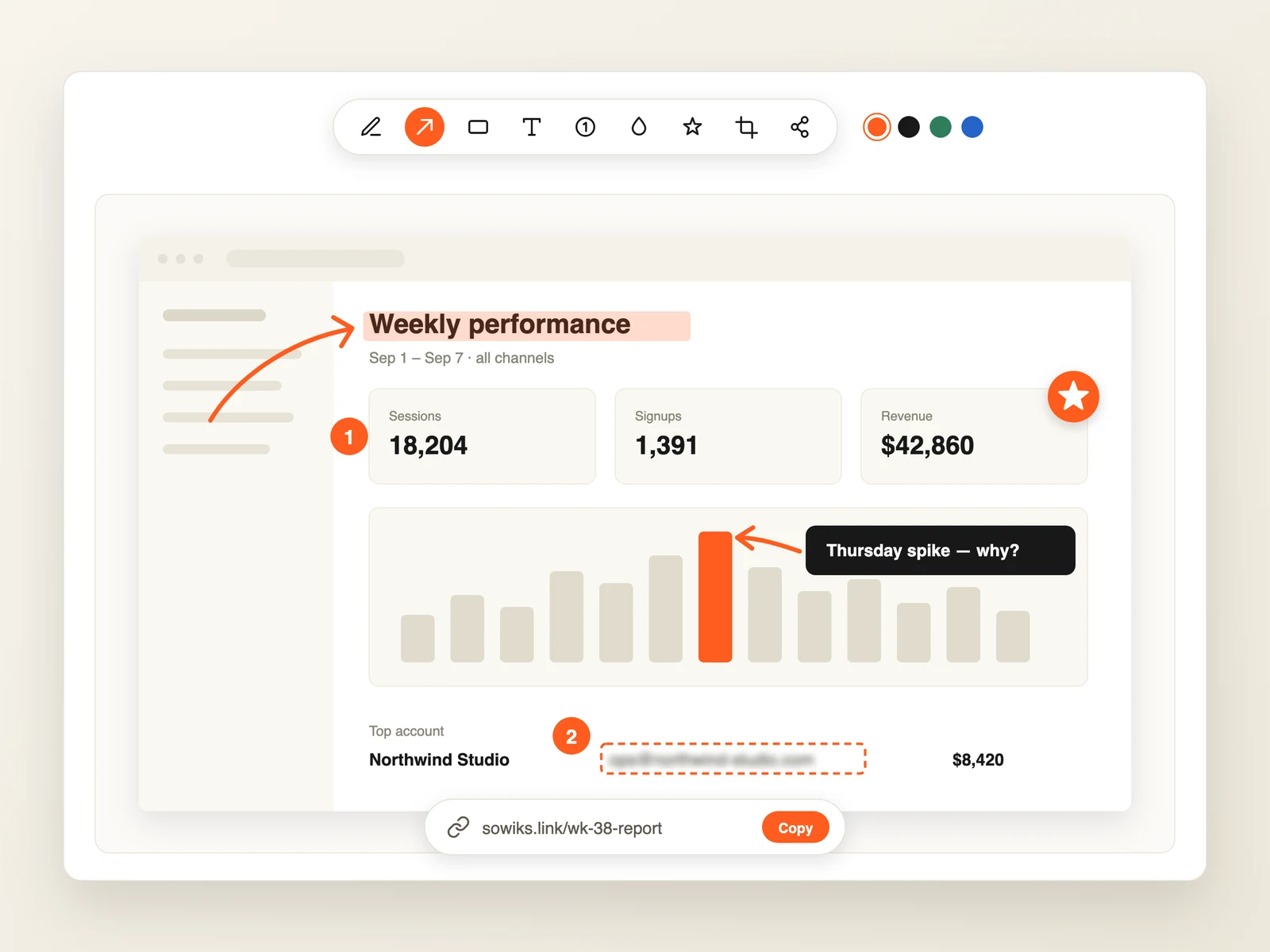
Same screenshot. Ten seconds later.
Drag the handle to see what a raw capture looks like once it has been through the Sowiks editor.

Shapes, Marker, Counter and Text — walk someone through a screen without writing a paragraph.
Everything after the screenshot, handled.
One capture — and Sowiks takes care of the rest of the journey.
What people are saying
From designers and marketers who use Sowiks every day.
“Beautiful landing, super reasonable pricing and I like the “annotations” angle 👏🏻”
“A simple screenshot app with everything you need for quick edits and sharing. The screen recording is a nice bonus too, especially when a screenshot isn’t enough to explain something.”

“Sowiks is a powerful screenshot tool every designer should have in their toolkit. I love it.”
“Absolutely the best screenshot app! Super fast, highly intuitive, and being able to send links instead of files is a game changer.”
“Started using Sowiks for screenshots and quick screen recordings. The screen recorder is probably my favorite part since I can just start recording without messing with settings.”
“Thank you for creating this app! It looks simple, yet very convenient and powerful.”

Best screenshot app for Mac for those who care about pixels
Powerful capture, editing, and sharing tools — designed for professionals
Advanced Capture
Area, window, full screen, scrolling, and OCR capture with your own hotkeys.
Built-in Editor
Annotate, draw, highlight, and blur right after you capture.
Highlight What Matters
Dim the rest of the image and draw attention to the most important part.
Add Text
Insert clear, editable text with different fonts, sizes, and styles.
Step Numbers
Add numbered labels to create easy step-by-step guides.
Blur Private Information
Quickly hide passwords, email addresses, and other sensitive information before sharing.
Color Picker
Grab any color's hex code straight from the screenshot — the cursor picks it up automatically. Press Tab to copy it.
Overlay Screenshots
Place one screenshot on top of another. Move, resize, and compare them with ease.
Resize Screenshots
Resize your screenshot to any size before exporting. Drag the corners or crop it to fit perfectly.
Beautiful Backgrounds
Add a solid color, gradient, or transparent background to make your screenshots look clean and professional.
Combine Screenshots
Capture up to 10 screenshots and combine them into one gallery with a shared link or ZIP file.
OCR Extraction
Copy text straight out of any screenshot.
Screenshot Collections
Keep your captures organized with collections and tags.
Cloud Storage
Upload to your Sowiks cloud and open your screenshots from any Mac or the web.
Instant Sharing
One-click links with optional expiration and password protection.
Record Video & GIF
Capture your screen with camera, mic and system sound — export a polished MP4 or a lightweight GIF, trimmed and ready as a link.
Capture History
The corner preview keeps your last three shots — copy, save or reopen one you already dismissed.
Your Own Shortcuts
Bind capture, recording and the editor to the keys you already press.
The screenshot tool that ends with a link, not a file
No more Downloads folder full of «Screenshot 2026-07-17 at 14.32.11». Capture goes up, link comes back — your teammate sees it before you switch tabs.
For designers
Share pixel feedback with annotations that stay attached to the shot — not lost in a thread.
For support
Answer «what do you see?» with one link. Customers open it instantly — no attachments, no logins.
For developers
Drop reproducible bug reports into Jira and Slack — the link keeps full resolution forever.
Three steps. Two of them are ours.
You press the keys you already know — Sowiks handles everything after.
You capture
Same shortcut, same crosshair — nothing new to learn.
We open the editor
Arrows, blur, text — the shot is ready to annotate instantly.
Link is on your clipboard
Paste it anywhere. Done before your teammate finishes asking.
Capture exactly what you need
Whether it's a specific region, a full window, or a scrolling page, Sowiks handles it all with pixel-perfect precision.
- ✓Keyboard shortcuts
- ✓Scrolling capture
- ✓Retina support
Edit with precision
Add context to your screenshots with a powerful set of annotation tools. Highlight, blur, or add text in seconds.
Share links, on your terms
Care about security? Turn any screenshot into a link with one click. Set an expiration time and add a password so it stays visible only to the people you shared the link with.
- ✓Link expiration
- ✓Password protection
- ✓One-click copy
Smaller files, same quality
Sowiks compresses every screenshot automatically, so they upload faster and take up far less of your storage with no visible drop in quality.
Take and share the collection of screenshots with a single link
Sometimes one screenshot is not enough. If you are making instructions or working in customer support, there is no need to share each screenshot separately. With Sowiks Collections Screenshot features, you can take up to 10 screenshots, edit them one by one, and share all of them as a single screenshot with one link.
Best for:
- ✓Instructions and onboarding
- ✓Bug fixing explanations
- ✓Marketing funnels examples, statistics reports
- ✓UX/UI reviews
- ✓Customer support
- ✓IT setup
- ✓Just in case
Lights. Screen. Action.
Record your whole screen or just one part of it — with your camera, mic, and the sound around you. Point things out with arrows and spotlights, blur anything private, then trim it and export a polished video or a lightweight GIF. Every recording turns into a shareable link the moment you stop — no huge files cluttering up your desktop.
Everything unlocked for 7 days
The trial starts with your first capture — no card, no account. After it, window capture and the full editor stay free forever, and Solo is a one-time $19.99 for the rest, with the first twelve months of updates included.
Free
What stays yours once the trial is over
- ✓Window capture, as often as you like
- ✓The full editor — 13 tools, blur, step numbers
- 🔒Area, full screen, scrolling, timer and OCRPro
- 🔒Cloud storage & share linksPro
- 🔒Screen recording — video & GIFPro
Solo
Buy the app, not access to it.
Free for 7 days first, no credit card required
- ✓Every capture mode, plus OCR
- ✓1 GB cloud storage
- ✓Permanent share links
- ✓Screen recording — video & GIF
- ✓No Sowiks branding
- ✓One Mac device
- ✓After that, Sowiks stays yours forever — no expiry, no subscription, no check-ins.Updates after the first year are an optional renewal. Skip it, and your current version keeps working as is.
Frequently Asked Questions
Everything you need to know about Sowiks.
How do I crop a screenshot on Mac?
How do I paste a screenshot on Mac?
How do I edit a screenshot on Mac?
How do I extract text from an image on Mac?
Is there a free trial?
What happens to my files when the trial ends?
How is my data handled?
How do I get Solo?
Ready to upgrade your workflow?
Capture, organize, and share your screenshots without the friction.
Get Started for FreeEverything unlocked for 7 days. No card, no account.